
Website for Local Business: Why It Matters When Customers Search Online

Why Every Local Business Needs a Website Today
Most customers no longer discover services by walking around or asking neighbors. They search online first.
When someone needs a plumber, electrician, clinic, homestay, tutor, or repair service, they type their requirement into Google along with their location. Businesses that appear clearly with complete information are far more likely to receive the call.
A website for local business acts as your official digital presence. It allows potential customers to understand what you do, where you operate, and how to contact you immediately.
Without a website, you depend entirely on third-party platforms that may not fully represent your services.
How Customers Choose a Local Service Today
Most people follow a simple pattern:
Search on Google
Look at nearby options
Open a few results
Check details and photos
Call the one that looks reliable
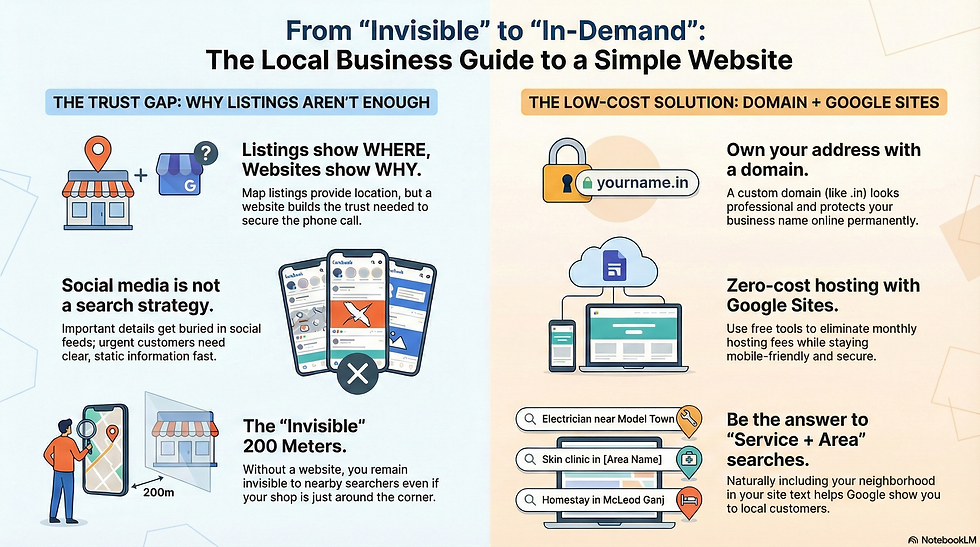
Listings help you appear. A website helps you look trustworthy.
Google Business Profile & Listing Platforms: Important but Limited
Google Maps listings, Justdial, and similar platforms are useful because they show:
Your location
Reviews
Phone number
Photos
Opening hours
But they cannot fully explain your services.
Limitations include:
Very little space for details
No proper explanation of what you do
No structured presentation
Competitors shown next to you
Customers may still be unsure before calling
Listings answer: Who is nearby? Websites answer: Who should I trust?
Social Media Alone Is Not Enough
Many small businesses rely only on WhatsApp or social media pages. While helpful, they have drawbacks:
Important information buried in posts
Hard for customers to find specific details
Requires constant activity
Not optimized for local search
Looks informal to new customers
When someone has an urgent need, they want clear information quickly — not scrolling.
Your Website Is Your Online Visiting Card + Brochure
For small businesses, a website does not need fancy features.
It should simply explain:
What service you provide
Which areas you cover
When you are available
Why customers can trust you
How to contact you immediately
Typical sections for a small service website:
About your service
Types of work you handle
Service areas or neighborhoods covered
Photos of work or premises
Experience or specialties
Contact number and WhatsApp button
Map location
It works all day and night, even when your shop is closed.
The Most Powerful Part: Service + Area Keywords
People search using both the service and the location.
Examples:
plumber in Sector 15 Panchkula
electrician near Model Town
homestay in McLeod Ganj
skin clinic in [area name]
RO repair service near me
If your website clearly mentions these naturally, Google can show your business to those customers.
This is how a website brings real inquiries.
Without a website, you depend only on listing platforms.
Why Many Small Businesses Still Avoid Websites
The biggest reason is not lack of interest — it is cost and complexity.
Traditional websites usually involve:
Buying a domain name
Paying yearly hosting fees
Development charges
Maintenance costs
Technical issues
Dependence on someone else for changes
For a small shop or local service provider, this feels unnecessary or risky.
A Practical Low-Cost Solution: Domain + Google Sites
There is a simpler way to create a professional website without ongoing expenses.
Step 1 — Buy a Domain Name (.in Works Well)
Your domain is your permanent online address.
Benefits:
Affordable
Easy to remember
Looks professional
Protects your business name online
Buying it for multiple years avoids renewal stress.
Step 2 — Build the Website on Google Sites (Free)
Google Sites provides free hosting with no technical setup.
Advantages:
No yearly hosting fees
Reliable and secure
Mobile-friendly
No server management
Simple to update
Works as long as your domain is active
This removes the biggest financial burden.
Step 3 — One-Time Setup for Content and Design
Instead of paying continuously, you invest once in:
Clear business information
Service + location optimized writing
Clean layout
Contact buttons
Map integration
After that, the website can run for years without extra cost.
Why This Approach Is Ideal for Local Service Providers
It suits businesses that depend on calls, bookings, or walk-ins, such as:
Homestays and guest houses
Small clinics
Electricians and plumbers
Repair technicians
Tutors and coaching classes
Tailors and boutiques
Local shops
Freelancers and home-based businesses
It gives you a professional presence without heavy expenses.
Small Changes Can Be Done Easily
You can update your site when needed:
Change phone number
Add new services
Update timings
Add photos
Post announcements
No technical knowledge required.
How an Optimized Website Keeps Bringing Customers
Once your website matches what people search for, it can generate inquiries continuously because it:
Appears in local searches
Builds trust instantly
Provides complete information
Makes contacting you easy
Supports your Google listing
It becomes your silent salesperson.
OsumYantra — Helping Small Businesses Go Online Professionally and Affordably
OsumYantra Design Studio focuses on practical solutions for businesses that need results without unnecessary cost.
What We Do
Help you choose and set up your domain
Understand your services and service areas
Write clear, business-oriented content
Optimize for local search terms
Create your website on Google Sites
Add call, WhatsApp, and map integration
Launch the site and guide you on basic updates
The goal is simple:
Give small businesses a credible online presence that customers can trust — within a realistic budget.
Final Thought
If people in your area are searching for your service online, you do not need a complicated website.
You need a clear, professional place where they can quickly understand what you do and how to reach you.
A simple, well-built website can turn nearby searches into real customers.
